Improving Accessibility in Education for Students with Learning Disabilities
Role
Designer
Project Type
User Interface | Research | User Personas | User Journey
Art Direction
Abby Guido
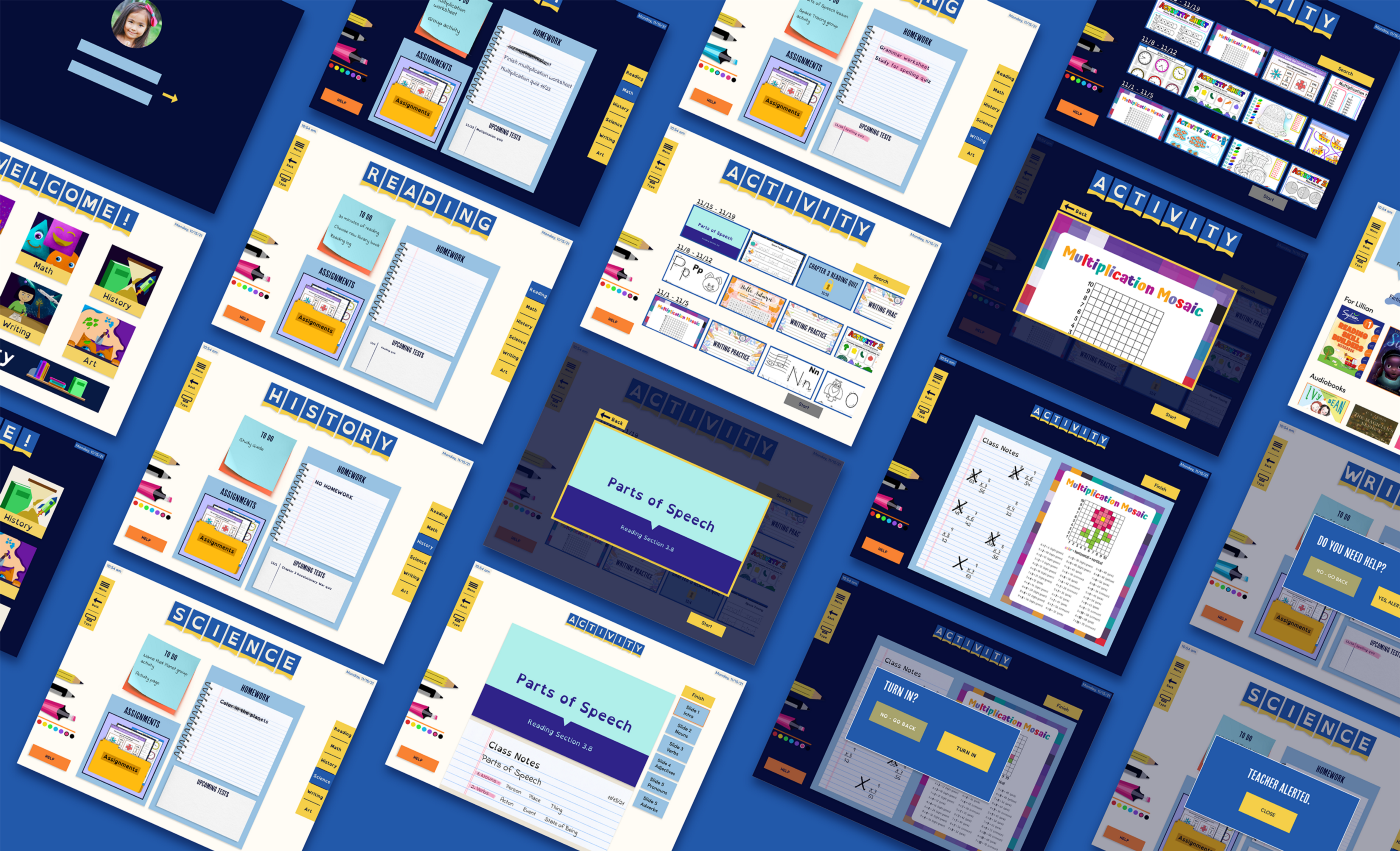
Wunderkind is an adaptive school desk interface designed to support diverse learning needs in the classroom. The primary objective is to accommodate a variety of learning disabilities, behaviors, and preferences among elementary school children while preserving the classroom environment. By integrating customizable features, the desk seeks to improve accessibility, classroom engagement, and learning outcomes for students with learning disabilities, making education more effective and inclusive.
Project Goal
Identifying the Problem
In America, students with a Specific Learning Disability (LSD) face barriers to academic success their non-disabled peers do not. The American public education system is designed to educate all children in one format, but does not consider the individual needs of each child. This harms all students but especially those with learning disabilities as public schools often face underfunding and a lack of resources and trained staff. This results in children falling behind in school, having to be educated away from their peers, and the improper use of individualized education programs (IEPs) which further harms students with LSDs. Children with an LSD also face social and mental health challenges as a consequence of stigma and lack of resources available to them.
The Stats
2.4 million students have a specific learning disability in the United States of America but only 35% have special education plans. 75% - 80% of students with an LSD have deficits in language and reading. One million+ students with an IEP miss three or more weeks of school a year. Children with learning disabilities are more likely to want to stay at home due to stress and are three times more likely to drop out than their non-disabled peers. In the 2021-2022 school year 15% of students with LSDs dropped out. Black and Hispanic students also face significantly more barriers in accessing help for their learning disabilities than their White and Asian peers.
Stigma, mental health, & social challenges
Children with learning disabilities are more likely to experience poor self esteem and mental health challenges than their non-disabled peers. Many experience anxiety and stress from school, feel less accepted by their peers, and have a higher chance of being bullied. They also face the stigma that they are less capable of achieving academic success which can further impact their self esteem. Many children with LSDs are also educated in separate classrooms than their peers, and while there are significant benefits this can provide, it can also increase feelings of isolation.
User Research
Wunderkind: a person who achieves great success when
relatively young
Logo
The logo is clean, made with simple shapes to ensure it is readable and accessible. The icon is a friendly elephant which is often a beloved animal among children and is symbolic of knowledge, wisdom, and strength. These gentle giants also stand for protection and familial bonds, both important for a child’s wellbeing. Below is the main logo, the secondary logo, and icon.
Style Tile - Focusing on Accessibility
Accessibility was the most important aspect to consider when designing the desk interface. With the target demographic having a variety of disabilities, it was imperative that the desk met those needs. Focus was placed specifically on color, contrast, typefaces, and buttons to ensure the desk was as accessible to as many children as possible.
Writing Tools
The desk has tools for taking notes, highlighting, and doodling to help with focus. This gives students the same tools they would normally have with physical supplies but contained within one stylus. Studies have suggested that doodling is conducive to memorization and learning so we felt it was important for children to be able to draw on the pages on the screen.
Typefaces
Various typefaces were included to give students options based on their needs. There are standard fonts as well as accessible fonts like OpenDyslexic that are designed specifically for people with dyslexia to use.
Buttons
The buttons are big and use colors exclusive to them, making it easy to identify each button as an action. The yellow buttons are for navigation and the orange are for getting help. The size of the buttons allow for easy access for children with dexterity issues.
Visual Design
Colors
Colors with high contrast were chosen so they were easy to see and read. Consideration was given specifically to color blind students and those who benefit from light text on a dark background. The colors work on both dark and light backgrounds and meet accessibility standards. The light background is off-white instead of pure white so there is less eye strain.
Overcomplicated Design
While the initial designs started off with many accessibility tools available for students to turn on and off, the discussion of how distracting this would be came up. With this concern in mind, we changed the design so the tools are only found on the homepage. This keeps them in reach but not constantly on the screen.
We also originally designed the desk to give students access to everything from classes to grades to calendars and more. This made the interface complicated and more like a device for older students in high school and college. We simplified the interface and focused only on classroom learning. This resulted in access given only to subject pages, assignments, an agenda book, library, and educational games.
The wireframes begin with a simple log in screen that opens to a homepage. Here students can find classes, their profile, and the accessibility tools they use.
Through the home screen, students can navigate to each class where they can access their agenda holding assignments, lessons, and educational activities
A library is included so students can access books, ebooks, audiobooks. This allows them to use whichever form of reading fits their needs best.
Other details include a page for students to track their upcoming tests and homework, with their parents being able to see the screens on their own interface at home.
Low-fidelity Wireframe
Problems and Changing Directions
The Teachers’ Needs and Abilities:
Teachers may have trouble learning how to use the desk depending on their technological abilities. It may also be a challenge to navigate the specific educational settings in each child’s desk. Potential technological issues bring to question if this would create additional stress for their job.
Children and Technology
Excessive amounts of screen time has been proven to have adverse effects on children and their overall wellbeing. Screens can impact attention spans and behaviors especially in young children so it is important to consider the potential negative effects this desk may have on student behavior. Children also spend more time on screens outside of school than they used to for homework, to play games, or spend time on social media. It is worth questioning how much additional screen time this desk would add to a child’s day and establishing a balance between using this device and non-screen class activities. School can be the one place a child is not attached to a device and that is worth protecting.
The Nature of Learning Disabilities:
Having a screen in front of students may allow them to get more distracted if the design is not carefully considered. The interface design should not be overly complicated and should only provide a few settings a child can change to limit the risk of becoming distracted.
Reflections


By the end of the project, we delivered a fully functional desk interface that improves accessibility in education, supports equitable individualized learning, and integrates seamlessly into a shared classroom environment. The final design incorporates intuitive, child-friendly tools that enable students to engage with lessons in ways tailored to their needs, without causing disruptions. Meeting established accessibility standards while maintaining usability and engagement, the outcome is a practical, scalable solution that enhances both inclusion and learning effectiveness in the classroom.